
RightEngagement
Will they respond?
Simulate cold emails, LinkedIn messages, and outreach sequences. See open rates, reply intent, and drop-off points before you burn through your list.
| ← Back to Right Suite | Run a simulation |
The Problem
Most founders write sequences based on templates they found online, tweak the subject line, and hope for a response. There’s no way to know if the message is genuinely compelling to your ICP until you’ve sent it to hundreds of people. By then, you’ve burned through the list - and the people who saw your weak opener aren’t going to respond to a better one.
85% of cold outreach is deleted before the second sentence. Reply rates double when the message speaks to a pain the buyer has right now.
The variable that kills most outreach isn’t personalization - AI has made that table stakes. It’s relevance: does your message speak to something the buyer is actually dealing with, in a way that doesn’t read as outreach?
How It Works
1. Submit your outreach Paste your cold email, LinkedIn message, DM, or full multi-step sequence, along with your target persona description.
2. Simulation runs The simulation generates synthetic buyer responses across your target audience, modeling open behavior, read-through rate, reply intent, and the exact point where momentum drops off in multi-step sequences.
3. Read your report Predicted engagement rates, tone diagnosis, objection signals surfaced by your message, and rewritten variants with projected uplift for each.
What You Get
| Output | What it tells you |
|---|---|
| Predicted open rate | Likelihood your subject line gets opened by your target audience |
| Reply intent score | How motivated synthetic buyers are to respond after reading |
| Sequence drop-off analysis | Which message in a multi-step sequence loses momentum |
| Tone diagnosis | Is your outreach coming across as genuine, pushy, salesy, or unclear? |
| Objection signals | What concerns surface in simulated buyer reactions |
| Optimized variants | Rewritten subject lines and openers ranked by predicted engagement |
Before / After
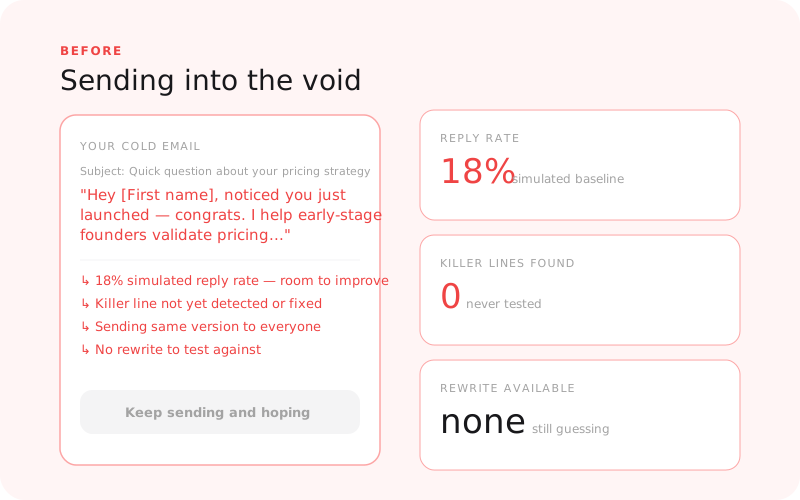
Before: sending blind and burning your list |
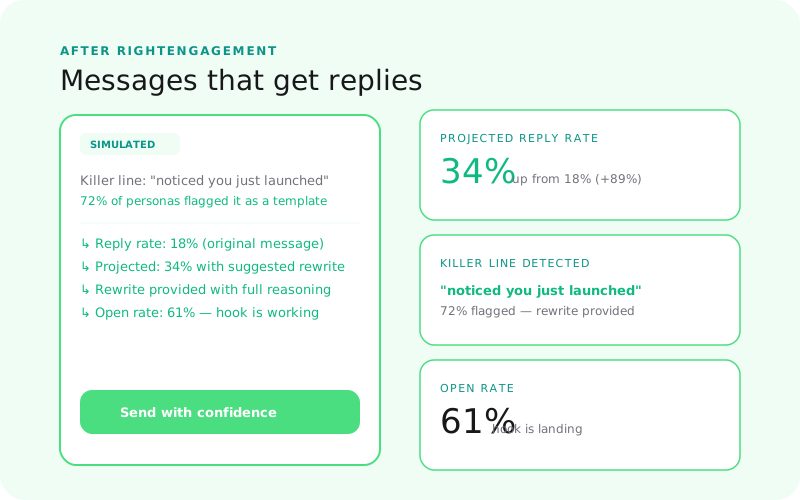
After: knowing what lands before you hit send |
Supported Outreach Formats
- Cold email (single send or multi-step sequence)
- LinkedIn DM
- X (Twitter) DM
- Slack community message
- Any 1:1 direct outreach format
RightEngagement vs. RightMessaging
| RightEngagement | RightMessaging | |
|---|---|---|
| Where the content lives | In their inbox - uninvited | On your surfaces - they came to you |
| Buyer psychology | High resistance, no context, delete by default | Active interest, willing to read |
| Primary variable | Reply intent, tone, does it feel like spam? | Conversion likelihood, clarity, CTA click |
| Use it for | Cold email, DMs, outreach sequences | Landing pages, emails to your list, announcements |
Where RightEngagement Fits
RightEngagement is step 5 in the GTM journey:
- RightAudience - Know who you’re reaching out to
- RightPositioning - Know your angle
- RightPrice - Know the offer you’re pitching
- RightMessaging - Know what copy converts on your own surfaces
- RightEngagement - Test cold outreach before burning your list
You can run RightEngagement without the earlier steps - but knowing your ICP and positioning makes the outreach test sharper.
Related Guides
- Why Your Cold Emails Aren’t Getting Replies
- Why Your Outbound Isn’t Working
- How to Write Cold Emails That Actually Get Responses
Who Uses This
- RightEngagement for SaaS Founders Pre-Traction - validate cold outreach before burning a list you can’t easily rebuild
- RightEngagement for Agency Founders Repositioning - test the new positioning angle in outreach before you commit to it
- RightEngagement for Growth Teams - score sequences before they touch your best prospect lists
- RightEngagement for Indie Hackers - don’t waste the warm list from your Product Hunt launch
Status
Live - www.rightsuite.co/products/right-engagement
Calculate Your ROI
RightEngagement ROI Calculator